
Get product updates
Every release closes the loop between creative and performance a little tighter.

You can work on your account inside your own Claude, with everything Plug knows in the conversation: the open Moves, the Creative Briefs and the creatives behind them, the approaches and tags winning and losing money, and Docs written for your workspace. Ask what to fix, and the answer names the ad set, the brief for it, and why that one.
Here is an example run worth sharing. A brand was launching a new market on a tight, unexpected schedule, and needed creative for it at short notice, with no time to wait on their creative partner. In a single Claude session:
Plug's decision layer met the brand's own market research and internal context.
The ready Creative Briefs that fitted the market and the need were prioritised and picked. The market-specific learnings and brand rules were captured in the Brand Kit.
Each selected Brief went to the tool that makes it: the statics into the team's design tool for translation and last-mile edits (Figma MCP), the video briefs through their own video animation generation (Higgsfield AI MCP) with the Plug-managed brand kit attached.
The finished creatives were scheduled for launch (Meta MCP).
This is not just about time and money. It is about speed: market openings, seasonal spikes and event-driven opportunities arrive and close on their own schedule, and the teams that can launch capture them.

With Plug, your account never runs out of fresh creative to test, and the winner that is fatiguing already has its replacement waiting. A Creative Brief in Plug is what to make next and where exactly to use it, shown as a finished example creative, chosen from what your creatives, your brand and your media buying say.
It arrives in the placements you actually buy: 9:16 for Reels and Stories, 4:5 for feed, 1:1 for the carousel card. Not one image cut three ways. Each is composed for its own frame, aware of each placement's safe zone.
Creative Briefs you like can be plugged into any production system you use through Plug MCP, exported in an editable file format, and soon launched straight from Plug to the recommended ad set on Meta and TikTok.

A Creative Brief in Plug is what to make next and where exactly to use it, shown as a finished example creative, chosen from what your creatives, your brand and your media buying say should come next.
Three controls in your Brand Kit decide what that example may be. Real people only casts from the reference photos you uploaded, never a synthesised face. No AI-generated images goes further: every brief, static or video, is built from your own media, nothing generated at all. Brief format holds every brief to statics or to video, or lets the data decide.
All three draw on the reference library in your Brand Kit: your logo, your product, your people. Each brief links back to the reference it used. If your brand is still deciding where it stands on AI-generated content, this keeps every brief transparent. The Brand Kit itself can be read and updated from your Claude through the Plug MCP, so a brand book or a market note goes straight into the kit.
Next: connect your media library, whether that is a Drive folder, a spreadsheet of links or a dedicated tool, so every brief can draw on everything you have.
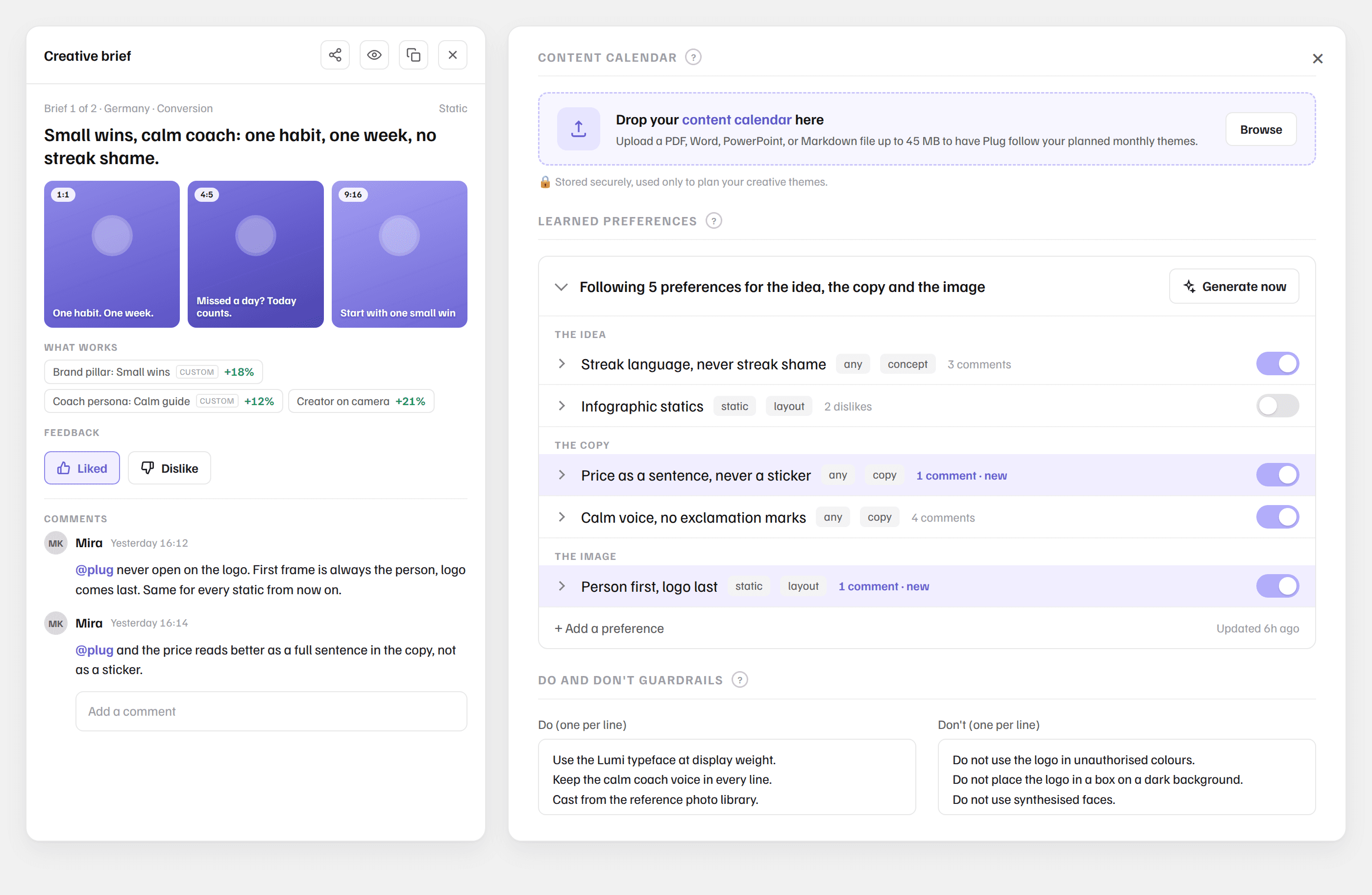
A Creative Brief in Plug is what to make next and where exactly to use it, shown as a finished example creative, chosen from what your creatives, your brand and your media buying say should come next: back a winner, fix what is fading, or test an idea the account has never run. Every comment you leave on a Creative Brief becomes part of how the next ones are written.
Comment on a brief the way you would brief a colleague: "never open on the logo", "our creators do not do voice-over", "don't show the login screen". Like what is right and dislike what is off. Plug reads the feedback and updates Brand Kit and preferences according to the Creative Briefs context, such as the format, copy texts and funnel stage. The resolved preferences live in your Brand Kit transparently, and they can be edited as you wish.
The learnings stick for every brief from Plug, either on the app or through the Plug MCP.

You can now keep the questions your team keeps asking as pages inside Plug. One question, one page, built on the same updated reading of your creatives and your media buying that writes your Creative Briefs and action recommendations.
The first two are built with you:
Competitor Insights: where each side is ahead, market by market, how the gap moved since last month, and which creative ideas only the competitors run, which only you run, and which the whole market shares.
Creative Performance: which of your creatives, creative approaches and tags win, where, and at what cost. Both live in Docs next to Moves and Creative Briefs, open to everyone in your workspace.
Example from the Competitor Insights page: how much of your creative volume sits in ideas your competitors run too, next to the ideas only they have made. Those are not a folder of saved competitor creatives. They become draft briefs, in your voice, one click from your creative team.
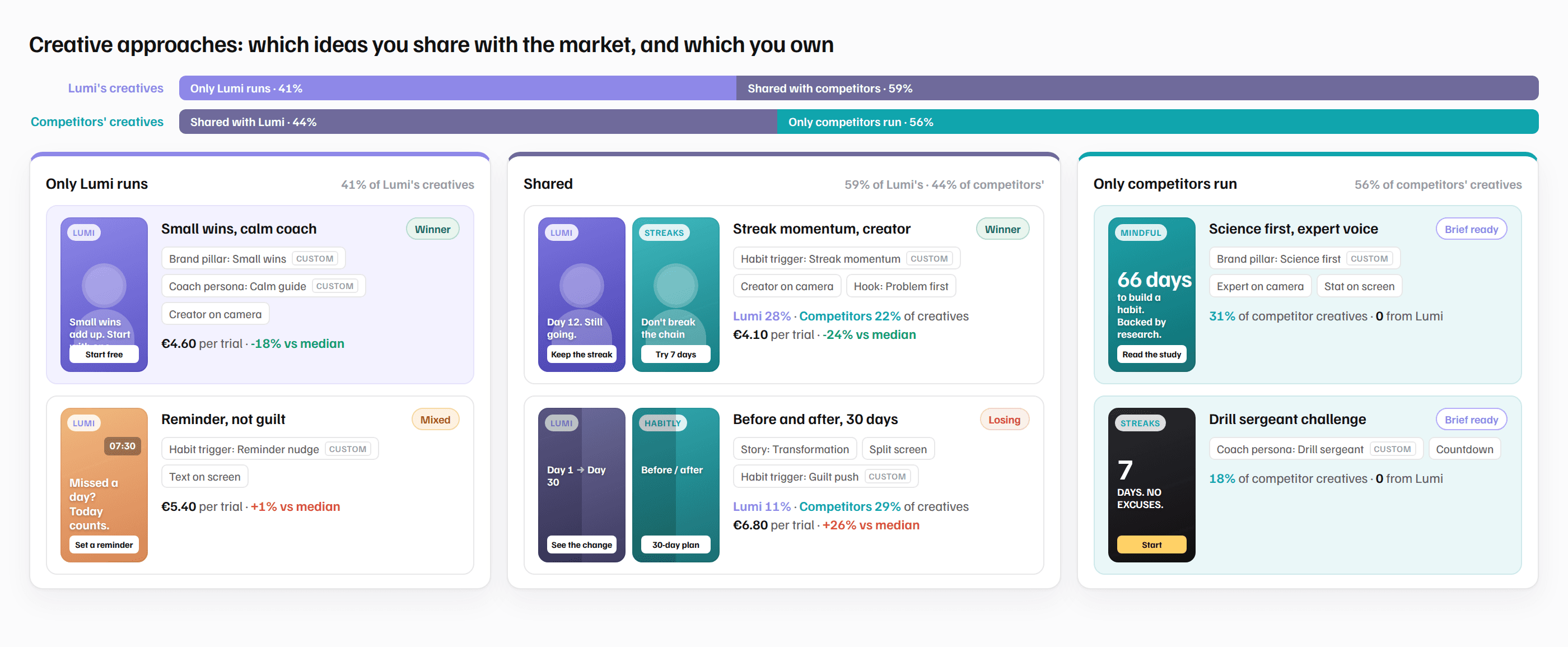
A Doc is written to end in an action, or it is not worth the page: the angle to brief, the market to scale, a hypothesis answered with numbers. It builds on Plug's decision layer, reading your context and the creative, not only the numbers. It is the same intelligence as Chat and the Plug MCP use, so the page and the conversation never disagree.

You can now write your creative strategy as tags, in your own words, and Plug puts them on every creative you run, in every market, the moment it ships. Then you find out whether the strategy was true.
Not casting, hooks or formats. Plug already reads those. The words your team actually argues about: which brand pillar the creative leans on, which segment it is for, the offer mechanic, the concept name from your own brief. Plug watches the video and reads the image, not the file name, and tags every creative the way your best analyst would if they had a week per creative. Your tags sit next to the 40+ standard ones, marked as yours.
Every tag is judged on the money: spend, conversions, cost per result on the event each campaign optimises for, per market, funnel stage, audience or format. “Which strategy works in Germany” stops being a quarterly deck and becomes an answer you can pull at any given time. The combinations you have never run, a pillar in a market, a segment with an offer, show up as gaps, and Plug drafts the brief for the ones worth testing.
A global delivery platform wrote five tags of their own and runs its whole creative review on them, market by market. The findings land before the next round goes into production, not after. Read how they did it.
Custom tags agreed with us at onboarding. Live in Creatives, Chat, your exports and the Plug MCP. Ask it wherever you work: which of our tags win in Germany at the conversion stage, and what have we never tried?

You can now export your creative tags, custom taxonomy included, and put them to work wherever your creative analysis lives.
Plug's tags dissect each creative for how it tells its story, how it is produced, and what it sells, by watching every video and reading every image the way your audience does. Naming conventions carry what the team planned, at best. The tags carry what actually shipped. Custom tags are supported alongside the 40+ standard ones.
One recent use case with an enterprise team: they added five tags of their own, which their rigorous naming convention could not capture. The performance team ran its full market-by-market Q2 analysis on the new tags and pulled insights they had never been able to produce at scale, and the creative team got them in time to shape the next cycle, not as a post-mortem.
And because every tag is tied to real spend, you can ask exactly how each one performs, judged on the outcomes your account optimises for: per market, funnel stage, optimisation goal, audience, media format, or any combination of them.
Explore and export in Creatives, ask for it in Chat, or pull tags straight into your own tools through the Plug MCP.

The Creatives surface on Plug now comes with a "library at a glance": your whole creative library in one card. Spend and its trend, live and new creatives, creative age, how many distinct ideas are running, how concentrated spend is on the biggest one, the video and static split, and the share of spend on fatiguing creatives.
It follows any slice you filter (a market, a funnel stage, audience, format, or creative approach) and stays put while you switch metrics.
When fatigue climbs, or one idea carries most of the spend, that is your cue to brief fresh creative, and the briefs on the same page tell you what to make.

When your winning creative starts to fatigue, the replacement is usually still a plan. In Plug, that plan is a creative brief: what to make next and where exactly to use it, shown as a finished example creative. Now the example exports as a working file your team can open and finish, so the next creative goes live before your CPA creeps, not weeks after.
Export any brief as a Photoshop file, as HTML, or as a plain image. The copy, the logo, and the layout come as separate pieces that your team can change, so they finish it in the tools they already use instead of rebuilding it from scratch.
What you export is not a generic template or a remix of an old winner. Every brief is grounded in a full read of your brand, what is working, what is fatiguing, and what you have not tried yet, so the file you hand your team is the next thing actually worth making.
Open any brief in Creatives and export it in the format your team works in, or pull it straight into your own tools through the Plug MCP.

Creative DNA is part of the intelligence behind Plug's creative briefs. The brief tells you what to create next; Creative DNA explains the evidence it stands on, so you can check the reasoning and dig into the data yourself. When the team asks why the top creative works, you have an answer that is not a guess.
Plug can do this because it watches every video and reads every image, the way your audience does, combined with the actual creative-level performance. Whether a certain type of hook, production and mood stops the scroll lives in the creative itself; you cannot read it from a caption or a file name.
Creative DNA breaks down every creative into its ingredients: the hook, the story, the look, the sound, and the offer. It then shows which of those win and which lose in your account, on the metric you choose, including custom conversions.
Find the creative DNA in Creatives, ask about them in Chat, or pull them into your own tools through the Plug MCP.

You can now give Plug your brand guidelines once, so the creative it generates comes back in your colours, fonts, tone, and logo rules.
Open Brand kit in Settings and import your brand book as a PDF. Plug reads it and fills in your colour palette, typography, photography style, tone of voice, dos and don'ts, messaging, and logo usage, among others. Review what it read, adjust anything, and save.
Everything Plug creates is grounded in a full read of your account, not guessed from a prompt. Your brand kit adds your look and voice on top, so the briefs and visuals come back ready for your team, not a generic draft to redo.
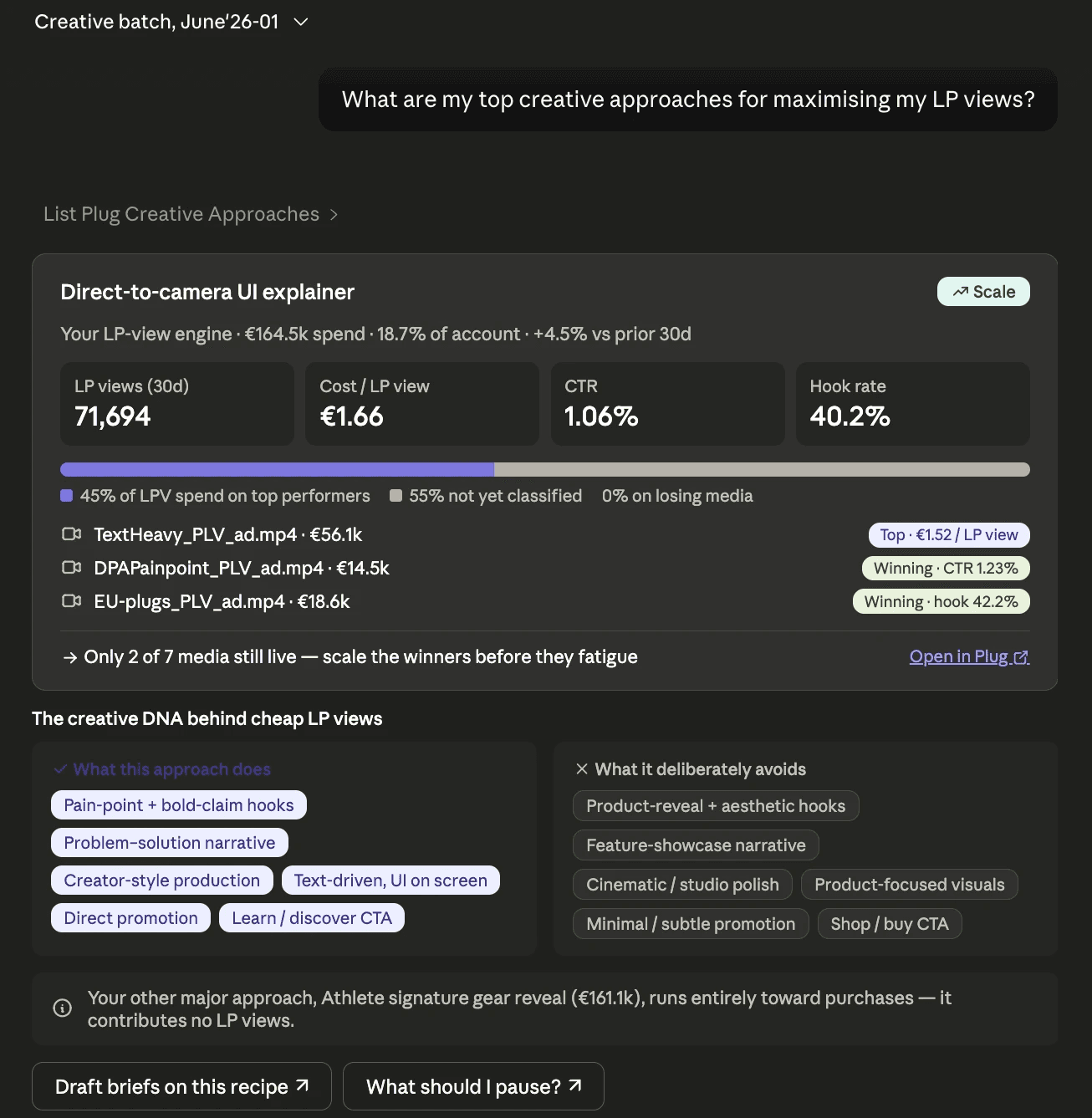
Plug now connects to Claude. Ask Claude what's working and get Plug's real recommendations back: your winning and losing creative approaches, the Moves to make next, and data-backed creative briefs for what to try next.
The difference from wiring a general AI straight to your raw ad data: that starts cold every session and will confidently get your numbers wrong. Plug's recommendations are already made, grounded in your own data and sharper every week. Now they plug straight into where you work.
What you can do today:
Ask for your top creative approaches, and what makes each one win or waste spend
Pull the open Moves for any of your accounts, and what action to take first
Get a data-backed creative brief for what to try next in a specific spot, built from what's working, what to avoid, and what you're already running
Setup takes about two minutes, read-only, your normal Plug login: docs.plug.inc/docs/mcp
This is the first step. We're starting with Claude and your creative and Moves recommendations; more of Plug, and the ability to push changes back will follow.
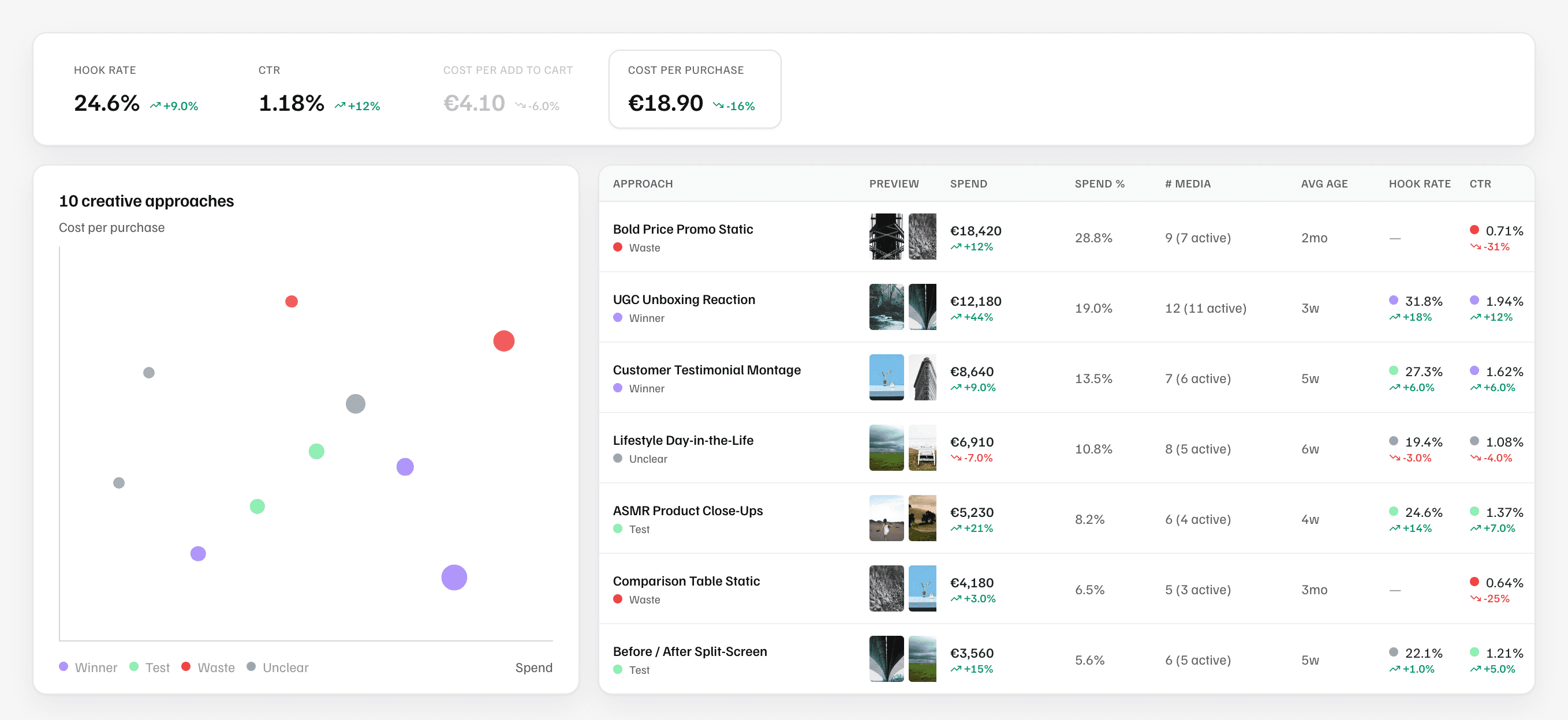
You can now see which kinds of creatives are working in your account, grouped automatically into Creative Approaches.
Plug reads each of your creatives the way a person would, both how it looks and what it is about, and groups the ones built on the same idea, not by file name or a single tag. Each Creative Approach, like "UGC unboxing reaction" or "ASMR product close-ups", shows which are winners and which are waste, judged on the outcomes you optimise for, how each is trending, and the tags that make it unique in your portfolio.
It answers the question every creative brief depends on: which kind of creative actually drives your results. Your approaches feed straight into the creative refresh recommendations on the Moves page, so your next brief knows what is already winning or losing in your account.
View approaches across a whole account or zoom into a single label, like a market or a funnel stage. Stop guessing what to make next: see which ideas win, which waste budget, and where there's room to test something new.
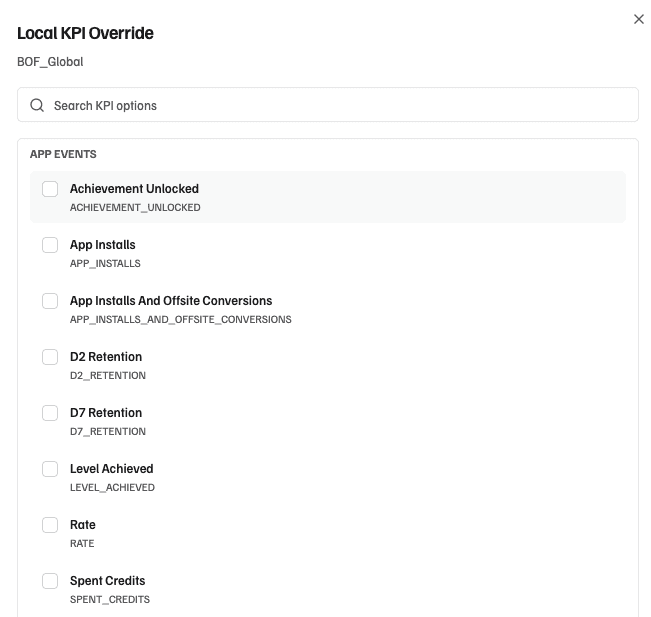
By default, Plug generates campaign-specific action recommendations primarily optimising for the campaign-specific optimisation goal you've set in Meta. That works most of the time.
But sometimes your real success metric is different from what you tell Meta to optimise for. You might optimise for link clicks to help Meta's delivery algorithm, while your actual goal is a custom conversion event. Or you track a business-specific metric that Meta doesn't know about.
You can now override the success KPI on any campaign. Moves recommendations, issues, and performance tracking all use the metric you define. Every campaign gets evaluated against what actually matters for you.
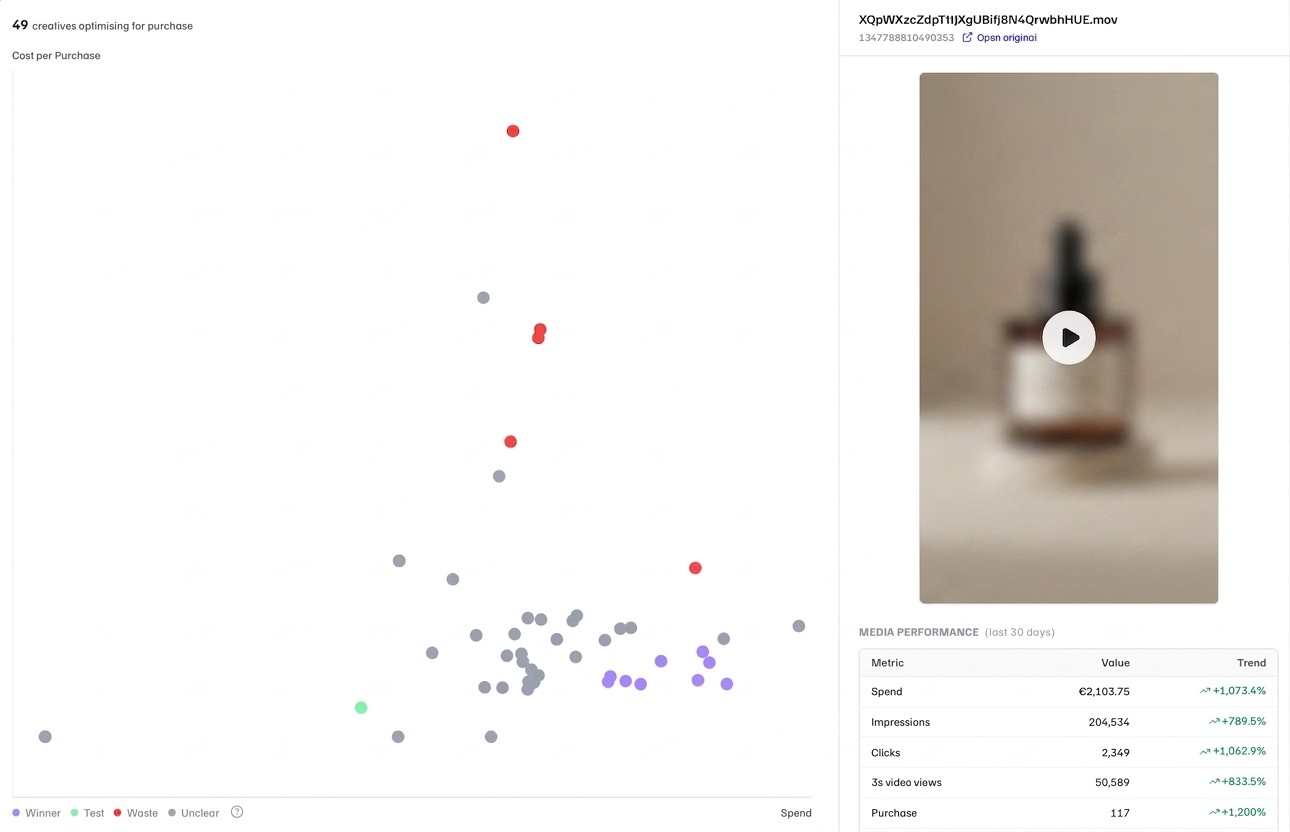
Creatives tells you which media and creative approaches work for your brand specifically, and recommends new creative briefs based on the creative intelligence and account performance.
Which of your videos drive the lowest cost per purchase? Which static images get clicks but no conversions? Is your best-performing hook from Q1 still working?
You can now visually explore your entire creative portfolio's performance across different scopes (like market or business lines) and see which specific media drive results per key metric, at a specific funnel stage, audience, or media type. Click any creative to see its full performance breakdown in context: spend, impressions, clicks, conversions, and trend.
Coming next: visualising which unique, distinct creative approaches you're actively running in your portfolio.

Moves combines what's inside your creatives (which hooks work, which formats fatigue, which creative approaches drive results) with how your ads actually perform, and continuously surfaces what needs action across your campaigns.
Now, whenever the system detects creative fatigue risk, you get a unique creative brief based on what's actually working in the specific context. Pass it to your creative team or save it for later.
Plug bridges performance and creative. Now, the question "what should we produce next?" has a data-driven answer, sitting right where you need it.

Chat lives on top of Plug's proprietary data for accurate and trusted analysis and reporting. It's built on top of your ad performance, creative intelligence (concepts, hooks, formats, elements), and GA4 conversions.
Now, it can read your Google Sheets too. Connect any sheet in Settings, and Chat queries it live alongside everything else. Reference a specific tab with @, the same way you'd use a Plug Prompt.
Two ways users are already putting this to work:
Custom performance metrics. Your actual business outcomes often live outside Meta: conversion values from your CRM, pipeline metrics from your analytics tool, KPIs from your BI dashboard. Many of these tools already sync to Google Sheets. Connect that sheet, and Chat combines your Meta ad performance with your real business outcomes in the same answer. The sheet syncs with the source, Plug syncs with the sheet. Always current.
Creative strategy, performance-aware. Another advertiser maintains their creative playbook in a sheet: creative direction, message pillars, scripts they've tested and plan to test. With the sheet connected, they ask Chat "which of our message pillars are actually driving results right now?" and get an answer that maps their strategic framework to what's performing in the account.
No manual copy-pasting. Connect your sheet, ask Chat.
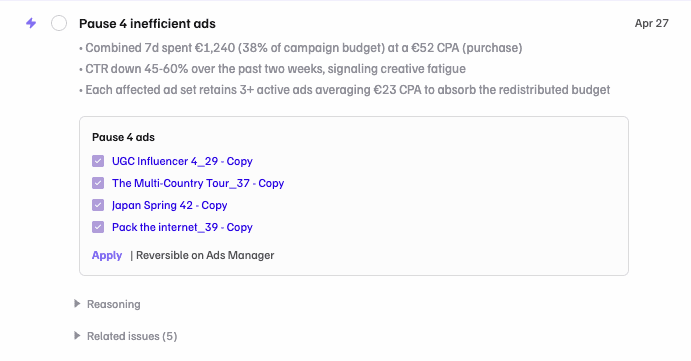
Moves combines what Plug knows about your creatives (which hooks work, which formats fatigue, which elements drive results) with how your ads actually perform, and continuously surfaces what needs action across your campaigns.
Until now, Moves told you what to do. You'd switch to Ads Manager and do it yourself.
Now, Moves can act. Click Autocomplete on a recommendation, confirm, and Plug executes it. Starting with pause recommendations. Budget actions and creative refresh are next.
This isn't a one-off analysis you prompt each morning. Moves runs persistently, adapts to your account, and sharpens as your creative history grows. What used to be manual debugging of underperforming campaigns becomes an one click act today, and autonomous optimisation tomorrow: actions you trust running on auto-approve, fatigued creatives detected and replaced based on what's winning and what's missing from your creative mix.
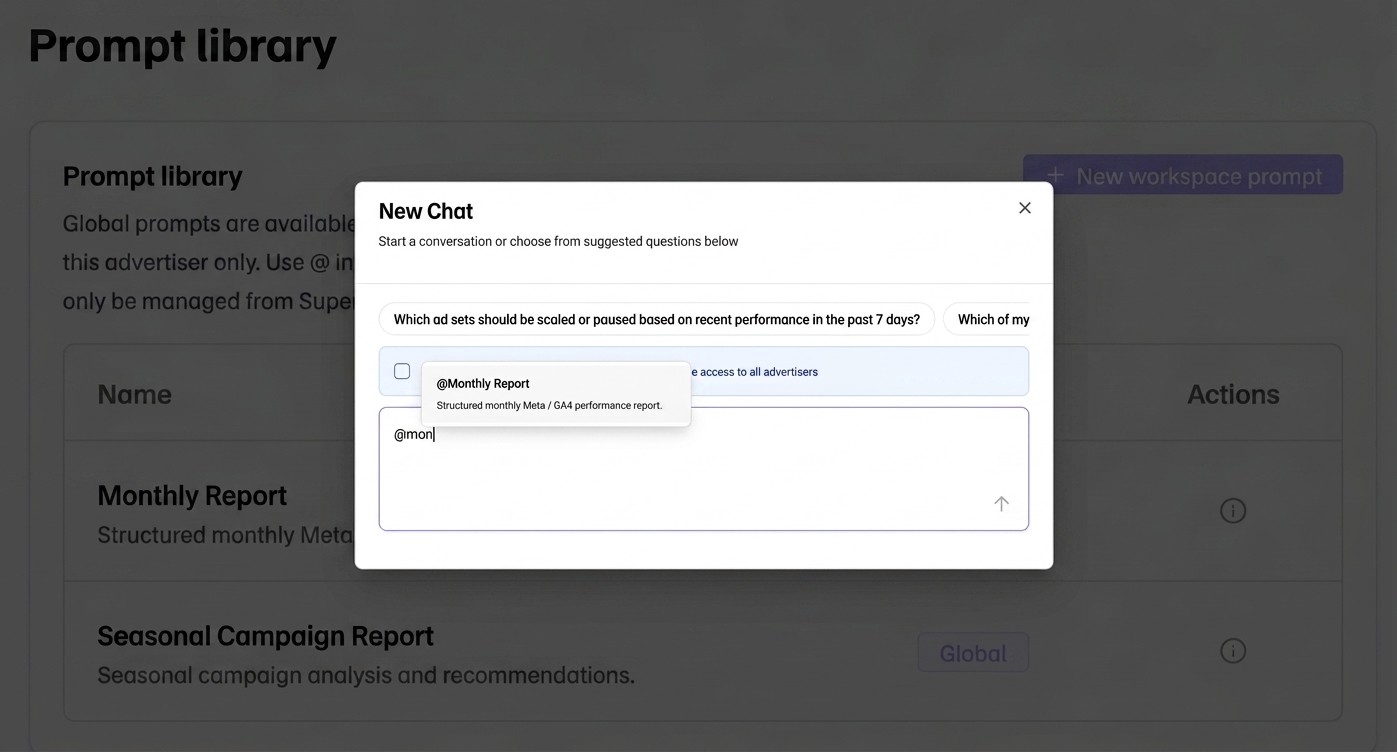
Same reporting updates, repeating weekly and monthly. Meta+Manus and Claude Cowork can query your data and generate charts. But can your monthly report include which creative hooks drove the lowest CPA? Does it comprehend that your B2B campaigns use a different target than B2C? Does it remember your naming conventions from last month?
Plug Prompts are report instructions that operate on top of everything Plug already knows about your account, and custom, structured performance and creative data:
What's inside your creatives. Plug analyses your ad creatives and tags them across hooks, formats, styles, visual elements, and narrative structure. Your report can include "UGC hooks outperformed studio footage by 35% on CPA" because Plug has decomposed every video.
Your account context, accumulated over time. Naming conventions, brand profile, KPI definitions, market structure. Every prompt inherits this automatically. You don't re-explain your setup every time.
Meta and GA4 in one query. Compare Meta CPA by market with GA4 conversion rates in the same report. Custom Google Sheets integration to ingest your own data is coming next.
How it works:
Save report instructions once: what's the insights you're looking for, what to compare, how to format. In Chat, type @, select the prompt, and add the specifics ("for March 2026", "for the DE market").
Chat follows your saved instructions with live data and full context, every time.
Two global templates built in:
Monthly Report: slide-ready content for a standard monthly Meta Ads performance deck
Seasonal Campaign Report: structured analysis for seasonal launches (BFCM, summer sales, product drops)
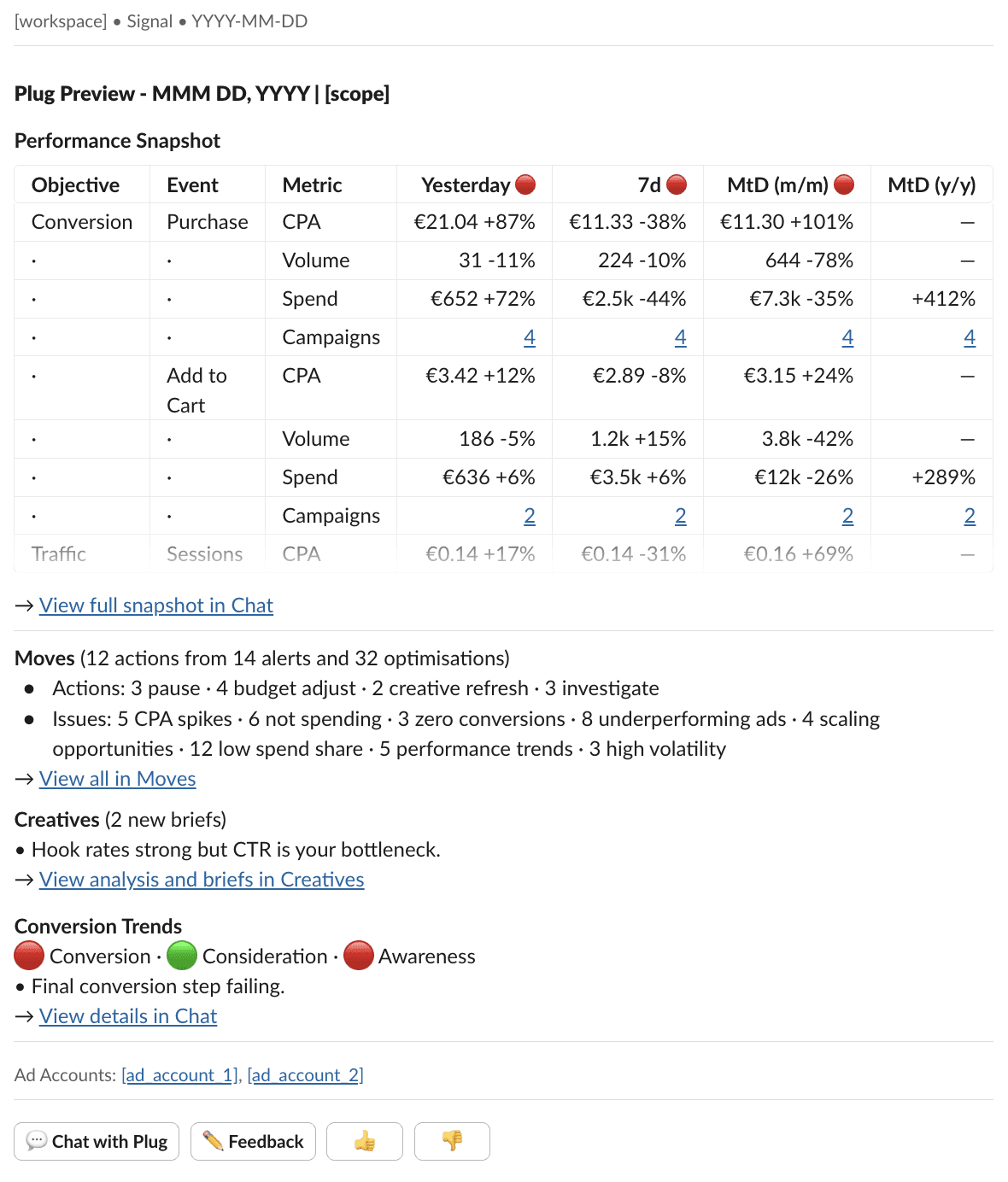
Every morning, one Slack message tells you everything you need to know about your Meta ad account. Open it, scan the table, and know if you need to act. Done.
Plug Preview surfaces
Performance development across timeframes. Traffic lights flag what moved across time frames. CPA, volume, spend by objective.
Action recommendations from Moves. Pending actions by type: pause, budget adjust, creative refresh, investigate. One click to the full picture.
Core findings from weekly Creative Briefs. New briefs surfaced with a one-line summary. Click through for the full analysis and production recommendations.
Weekly conversion trend changes. Funnel health at a glance: traffic lights per stage and one diagnostic insight.
Accounts for your account structure with Scopes
Your ad account structure might not be simple. Maybe you have several ad accounts to run separate markets, or you want to see testing campaigns separately from always-on. Plug Preview handles this with scopes:
✅ One per ad account by default
✅ Combine several ad accounts into one
✅ Label-based: split "Testing" campaigns from "Always-on" within the same ad account, because they have different performance expectations
✅ Custom schedule: testing scope on weekdays only, always-on daily, each at the time that fits your morning
No tabs to open, no dashboards to check. See the status, dig deeper and take action only where it matters.
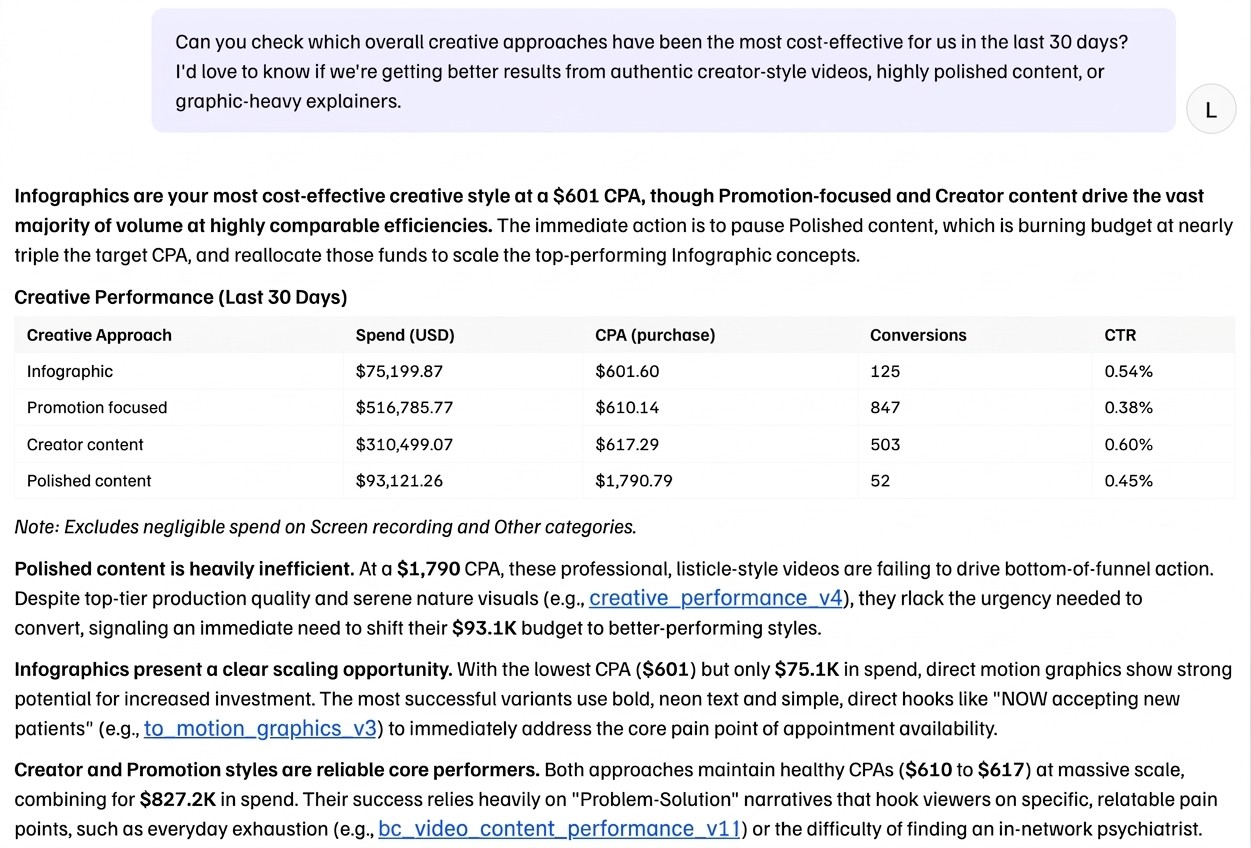
Meta ad data is messy. Chat makes it reliably queryable: ask plain-language questions, get answers grounded in your actual performance data.
What's new
Improved creative-level analysis: ask how a specific creative style or format performs across campaigns and markets
Inline feedback: like, dislike, and copy on every response to improve the system replies over time
Scatter plot support: plot your data on a scatter to spot patterns visually
Coming next
Standard reporting: set up report templates that match your format and style. Chat fills them in with fresh data, so you skip hours of manual report building.
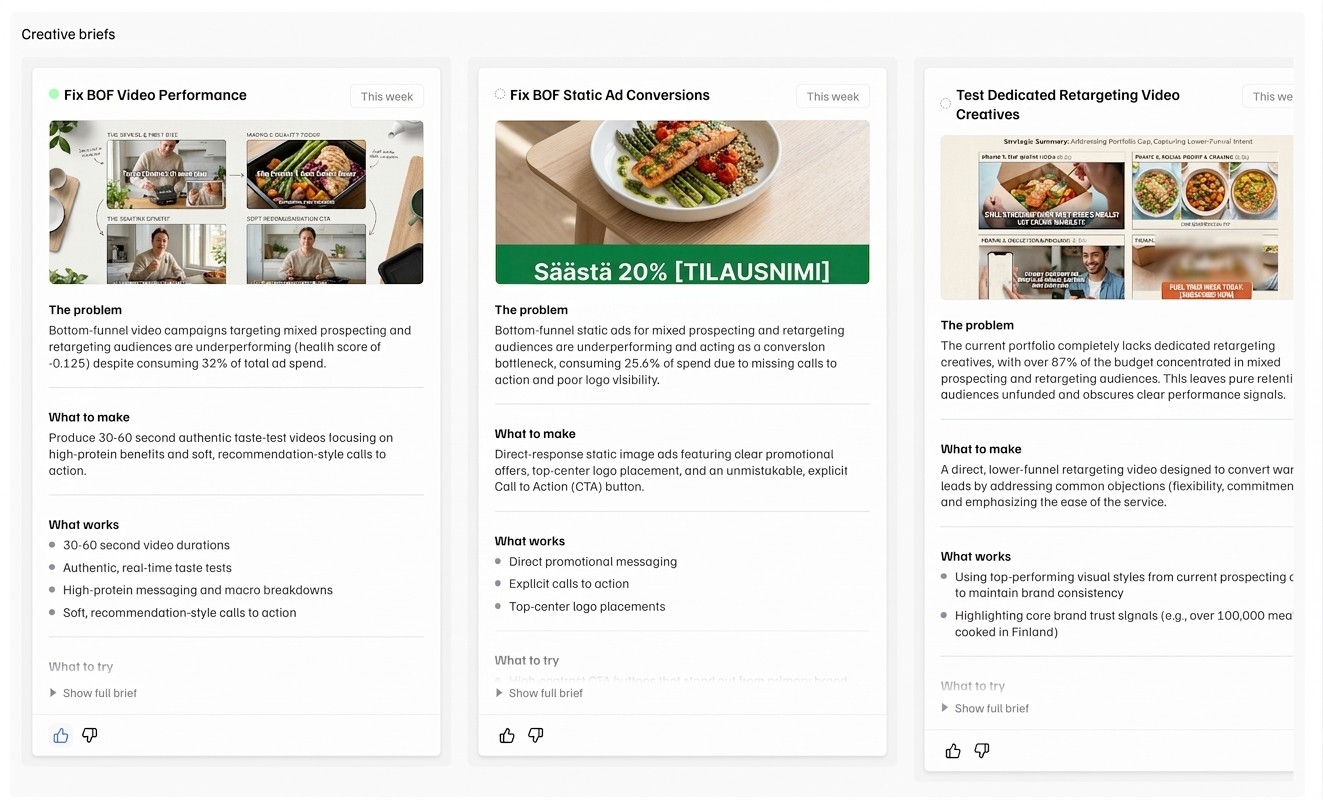
Before, Creatives told you which media perform and which ones don't. Now, it recommends what to produce next. Creative Briefs turns your winners and losers into creative recommendations in a relevant context.
What's new
Creative Briefs: recommendations for your next creative production batch, based on deep, context-aware creative element level analysis.
Coming next
Continuous creative optimisation: Moves spots fatigue, Creatives recommends the replacement. You always know what to produce next, before you need to.
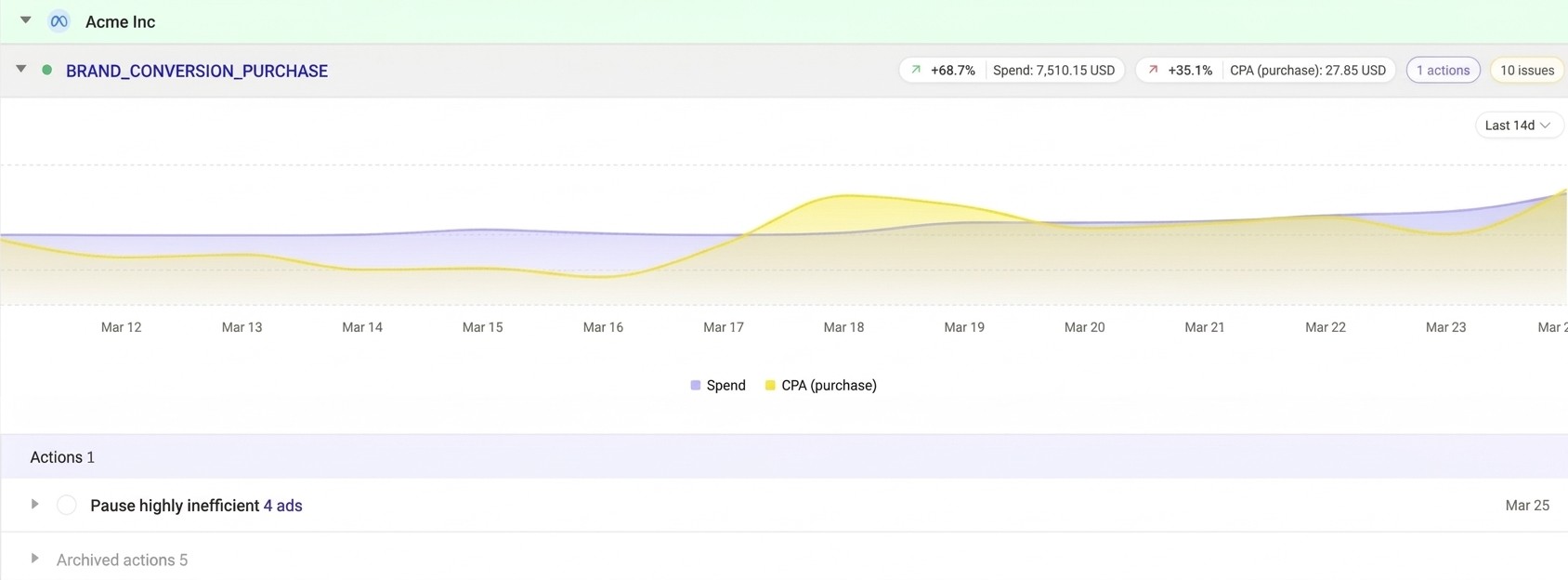
Moves watches your ad account 24/7 and tells you what needs action. Our recent fixes make the recommendations more trustworthy.
What's new
Smarter pause recommendations: Plug now recognises when an ad is still learning and won't tell you to kill it too early. You only see "pause this" when the data backs it up.
Coming next
One-click execution: see a recommendation you agree with? Plug takes the action in your Meta ad account. No more switching to Ads Manager.
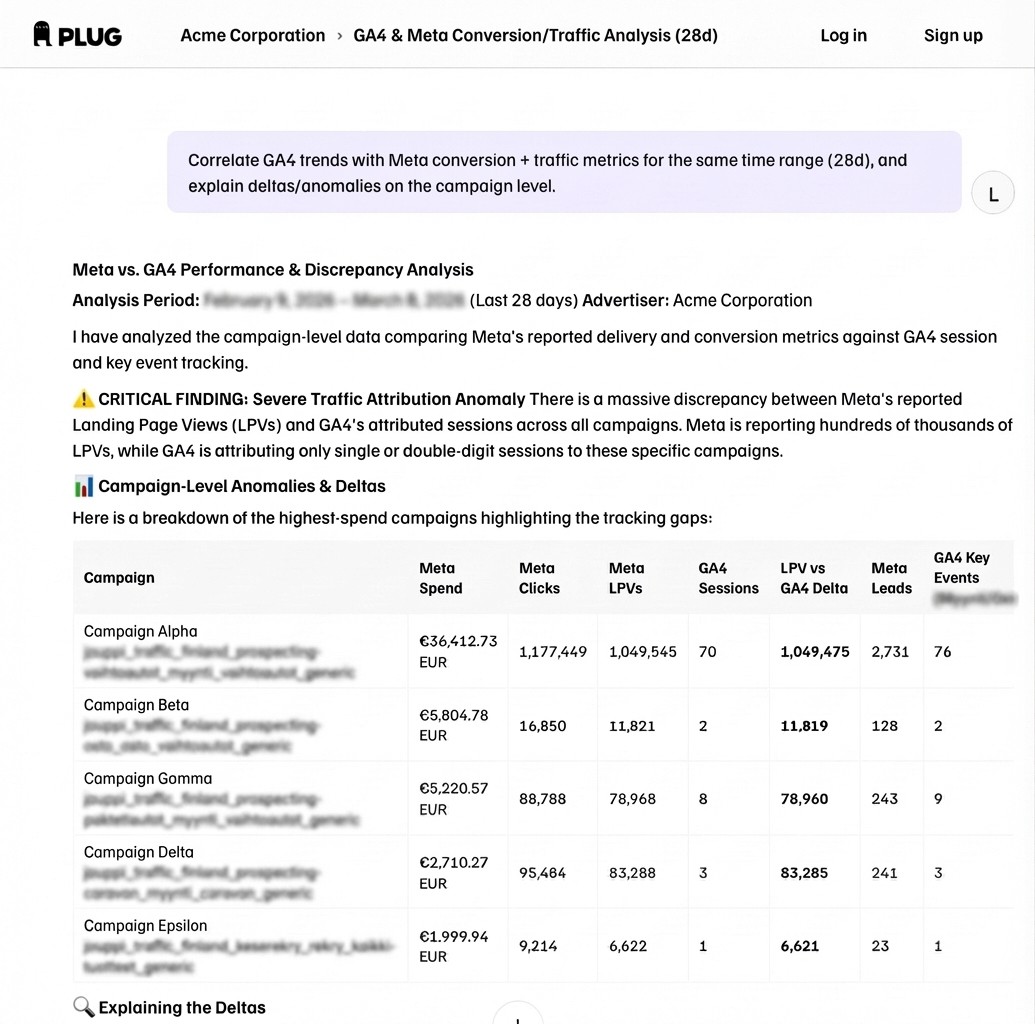
You can now ask questions across Meta and GA4 in one conversation.
Example: "Which traffic sources drove the most purchases this week?"
Chat pulls from your connected GA4 properties and links directly to the relevant GA4 report.
Also improved: better handling of custom conversions, so answers are more accurate.
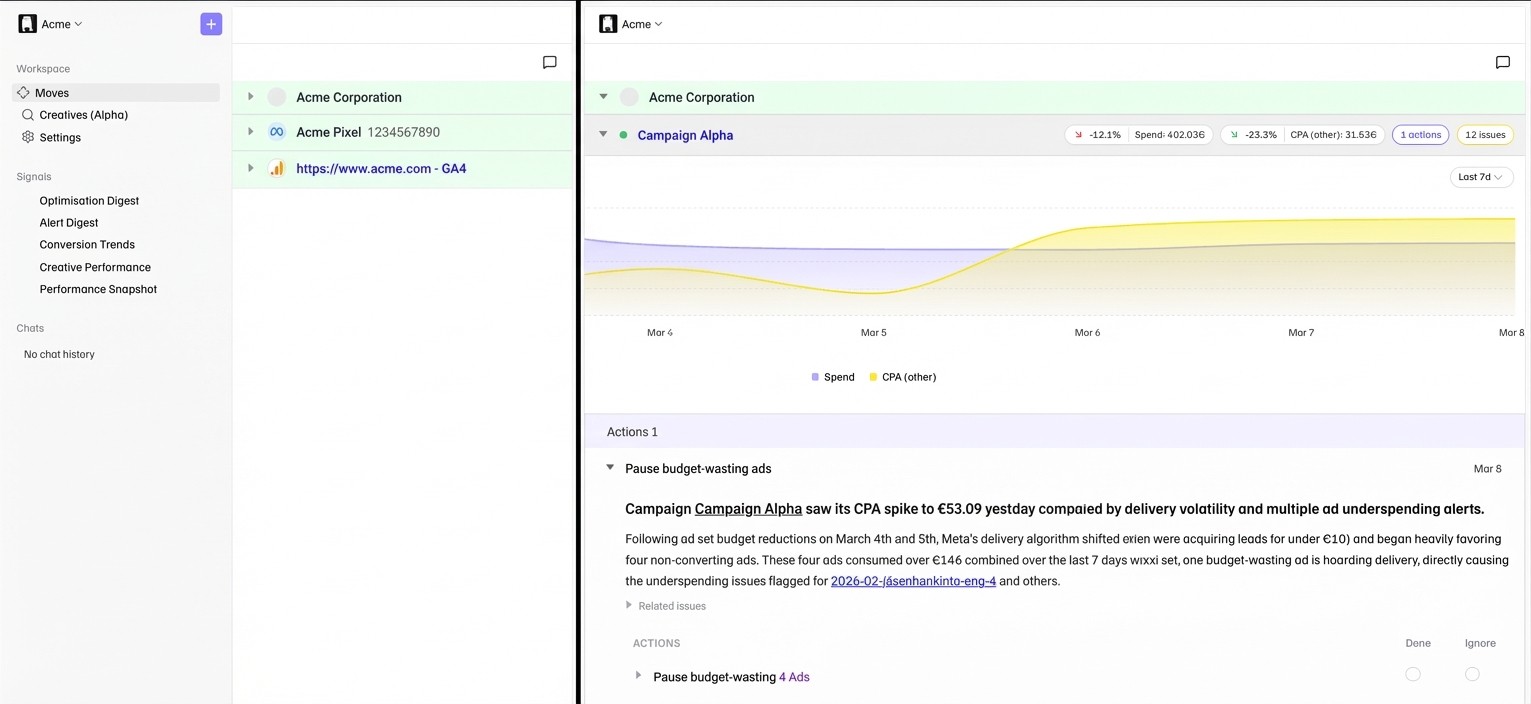
We've upgraded the Moves analysis engine to surface more accurate and actionable recommendations for campaign-level issues.
What changed
Issues are now grouped by type for easier scanning
Action recommendations link directly to the flagged entity in Ads Manager
Expanded rule coverage: pixel and GA4 tracking, more campaign-level patterns
Improved handling of stale and resolved issues
Coming next
"Autocomplete" for action recommendations: act on certain flagged issues with one click.
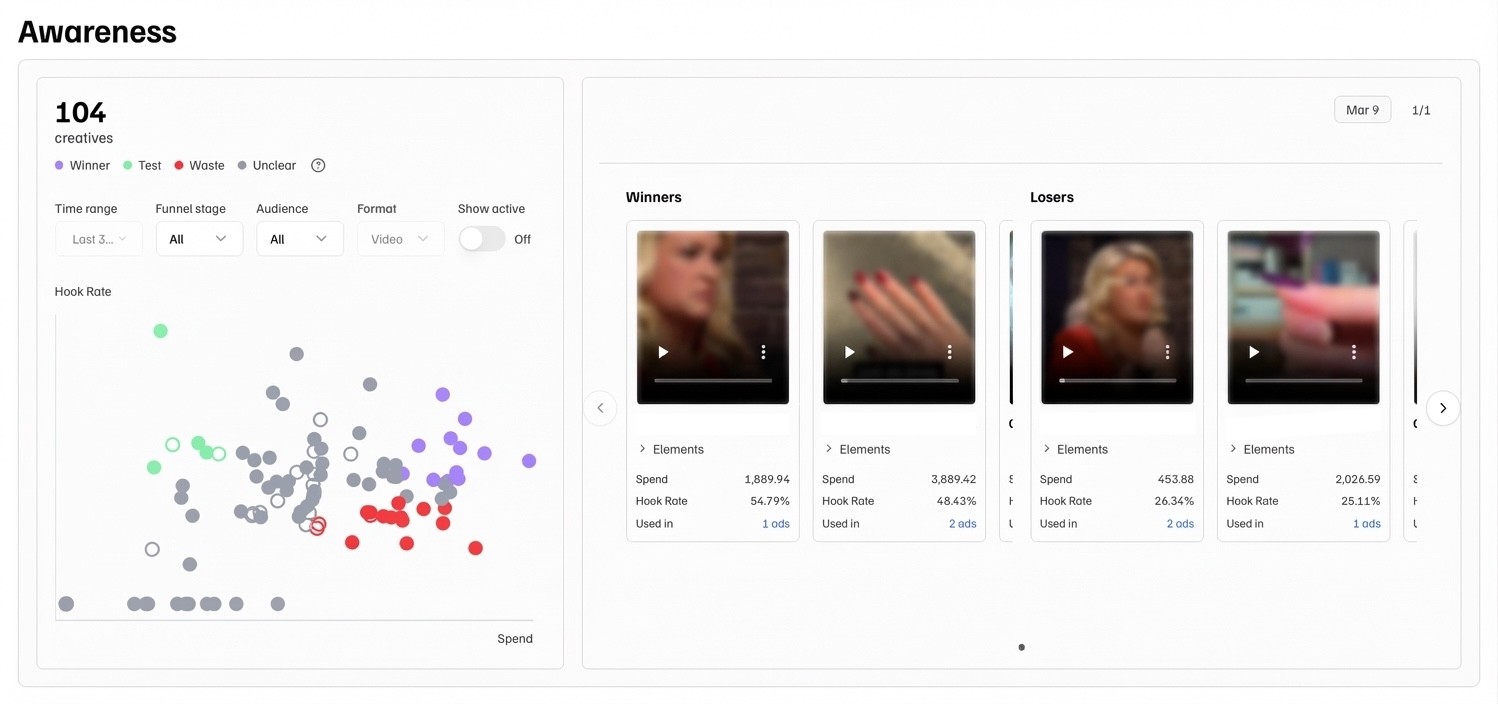
We've launched Creatives (Alpha): a new page for understanding creative performance and preparing your next batch.
Which creatives are delivering? Which ones are wasting budget? Creatives answers these questions without digging through Ads Manager columns or laborious spreadsheet exports.
What's live now
Scatter plot showing creative performance, updated daily
Weekly winners and losers highlighted with thumbnails
Filter by ad account or label
Where are we taking this
Analysis of why winners are winning, and creative briefs that suggest what to try next, with examples.
Find Creatives in your sidebar. We're collecting feedback on what's useful and what's missing.
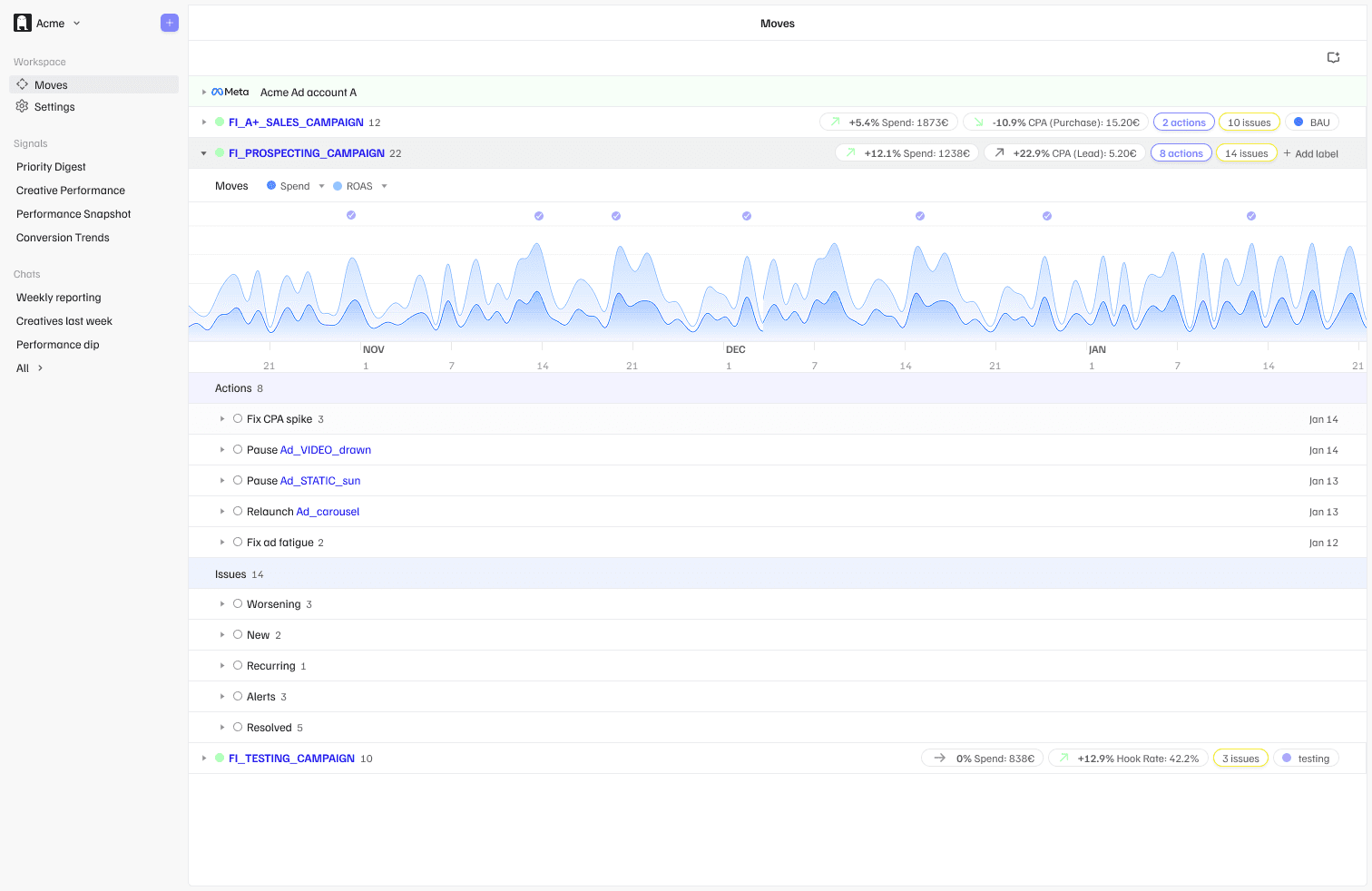
We’ve introduced Moves: a new feature for investigating performance issues and acting on them.
When an account underperforms, finding the root cause often means manually digging through campaigns, ad sets, and creatives. Moves brings that workflow into one place.
What it does
Lists flagged issues and analyses root causes
Recommends specific actions to resolve them
Groups everything by campaign for easier prioritisation
Lets you mark actions as Done or Ignore
Includes deep links directly to Ads Manager
Moves refreshes daily based on your Optimisations schedule. We’re starting with selected issue types (e.g. CPA spikes, underperforming campaigns). Coverage will expand over time.
How it connects
Alerts and Optimisations notify you something needs attention.
Moves gives you the full context and recommended next steps.
Open Moves in the app to see what’s flagged, no setup required.
Coming next
Creatives feature with performance insights and briefing support
Simplified Slack Signals with clearer actions
GA4 data in Chat
We’ve upgraded the Optimisations signal for campaigns tagged testing so Plug now automatically recommends when a creative is ready to graduate into always-on, or when it should be paused.
What changed
Graduate — Testing ads in the top 50% for both click-through rate and cost efficiency
Pause — Testing ads in the bottom 25% on either metric after 9+ days
Not picking up — Ads that haven’t received meaningful impressions after 9+ days
This means less manual monitoring — Plug helps you know what’s working and what’s not faster.
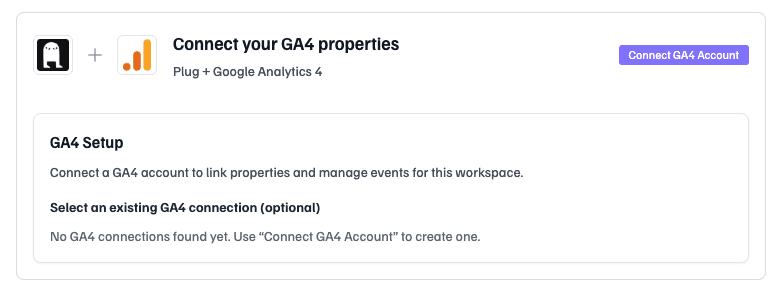
You can now connect your Google Analytics 4 properties to Plug and get proactive alerts when key events drop — across your site or by traffic source.
What Plug monitors
Key Events synced directly from GA4 (purchase, begin_checkout, generate_lead, etc.)
Week-over-week conversion changes by source (facebook/paid, google/cpc, organic, direct)
Property-wide drops across all traffic
Daily anomalies and sudden event failures
Why it matters
Tracking issues and conversion drops often go unnoticed for days. Plug now monitors GA4 automatically, so you catch problems fast.
Where it shows up
GA4 signals are embedded directly into Alerts and Optimisations.
How to connect
Go to Settings → Integrations
Click Connect GA4 Account
Select your GA4 properties
Sync your Key Events and choose what to monitor
Coming soon
GA4 data in Chat, so you can ask questions like:
“Which traffic sources drove the most purchases this month?”
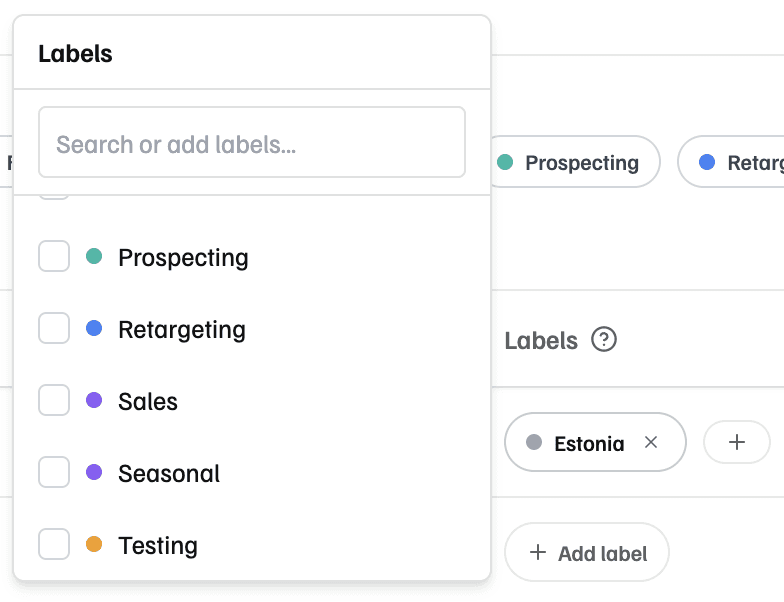
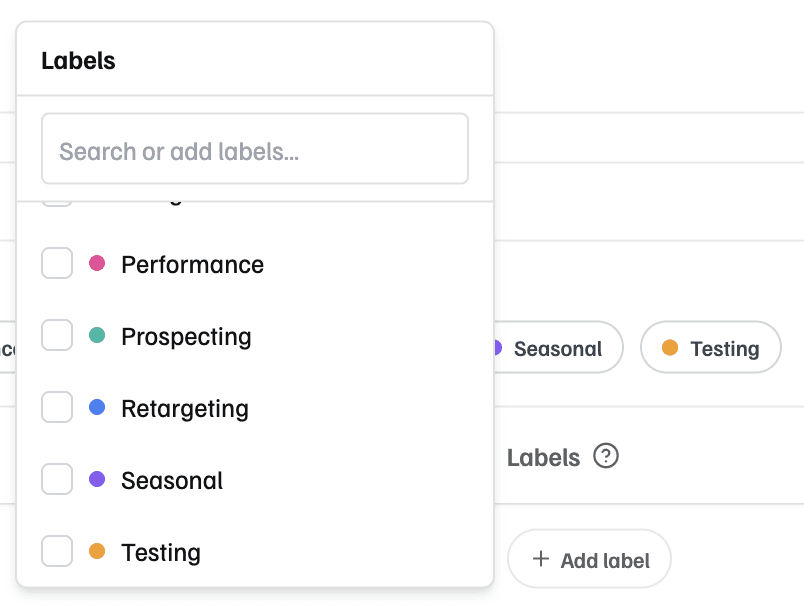
You can now label campaigns and receive separate Performance Snapshots per label.
Useful if you:
Run campaigns across multiple markets (SE, DK, FI)
Manage different business units or brands in one ad account
Want to separate testing from always-on activity
How it works
Add labels under Settings → Campaigns
Choose which labels get their own Snapshot in Settings → Signal Delivery
Optionally include unlabeled campaigns in a combined Snapshot
Unlabeled campaigns stay grouped together by default — no need to label everything.
Coming next: campaign labels across more Signal types.
No changes needed if this isn’t relevant for your setup — campaign exclusion still works as before.
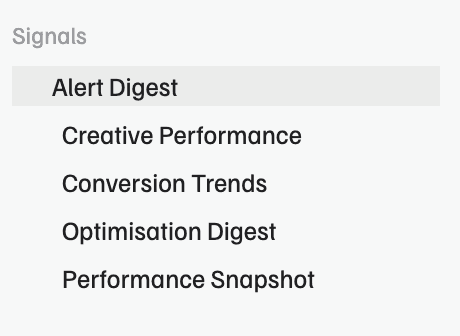
We’ve split the Priority Digest into two clearer streams:
Alerts — urgent issues that need immediate attention
Optimisations — improvement opportunities you can act on when convenient
This makes daily monitoring lighter and more focused.
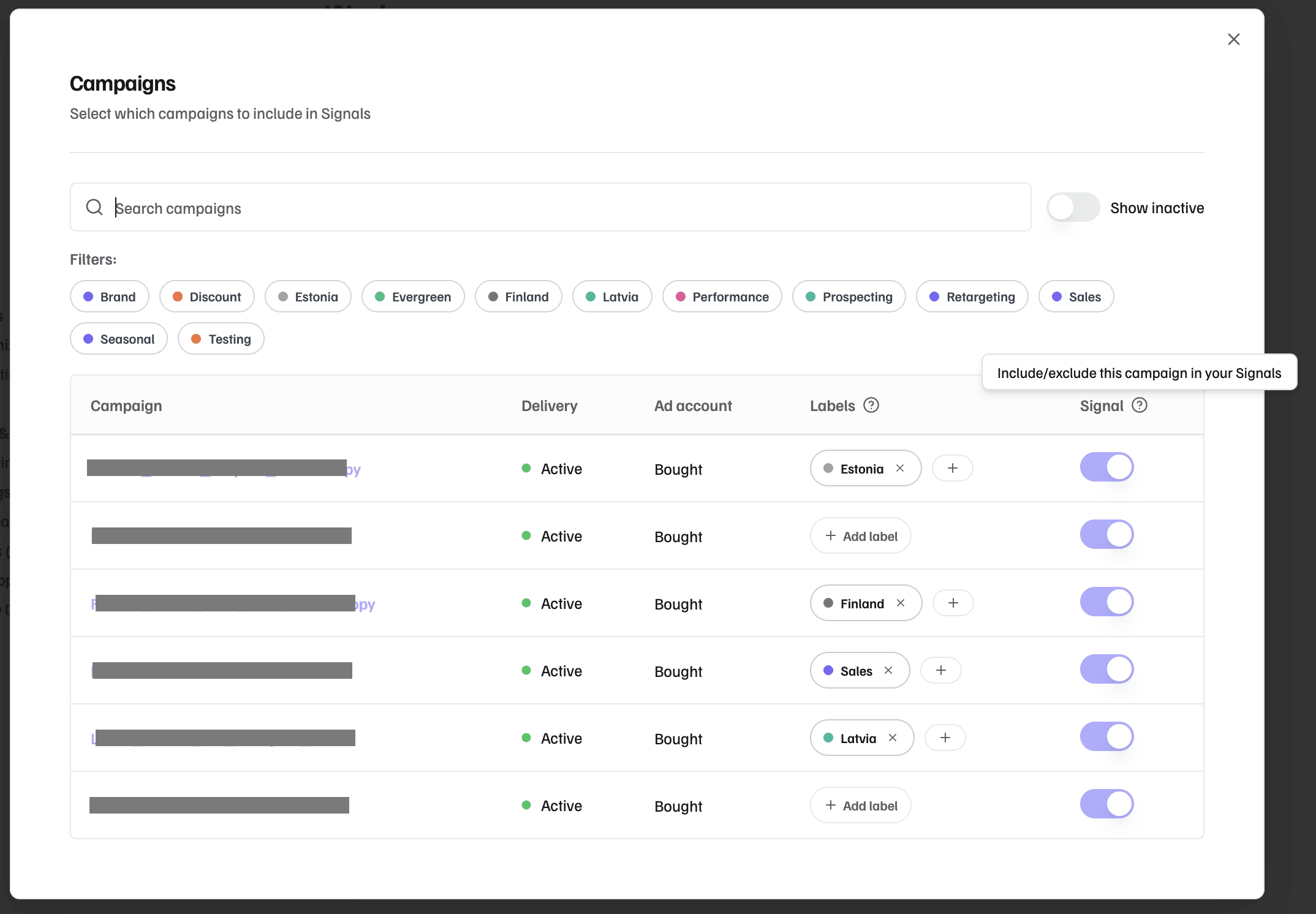
You can now choose which campaigns Plug includes in Performance Snapshot.
Configure it anytime under Settings.
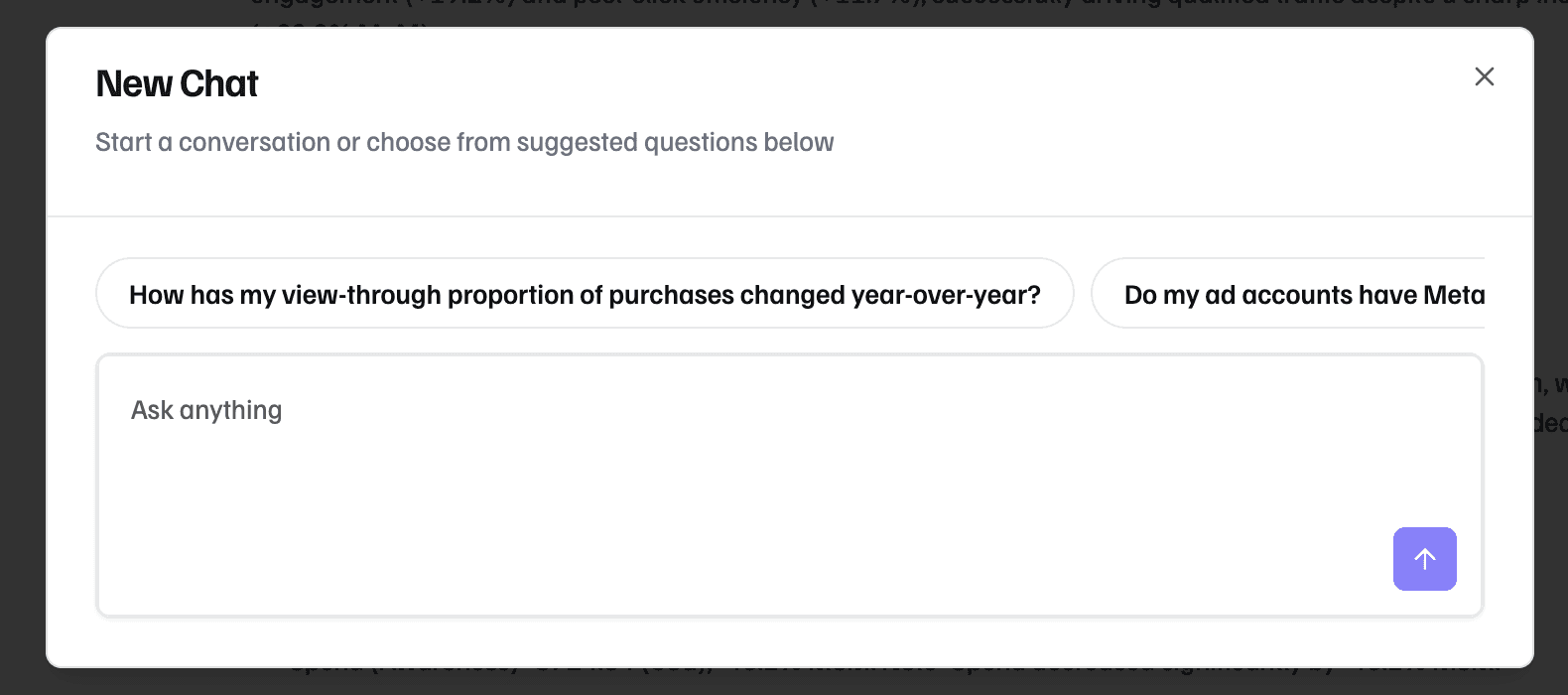
We’ve rolled out new updates to make Chat more flexible and easier to use:
Start conversations anytime, not only from Signals
Suggested questions help you get going when you’re not sure where to start
Follow-up prompts keep the conversation moving
Share full conversations with your team in one click
We’re opening up the first version of Plug Chat — a new way to ask questions about your Meta performance in plain English.
Instead of exporting data or digging through dashboards, you can simply ask:
“Why did CPA spike last week?”
“Which creatives performed best in October?”
“Give me a 30-day recap with creative insights”
Chat is already connected to your workspace context and campaign data, so answers are grounded in what’s actually happening in your account.
Early access is live in the app.
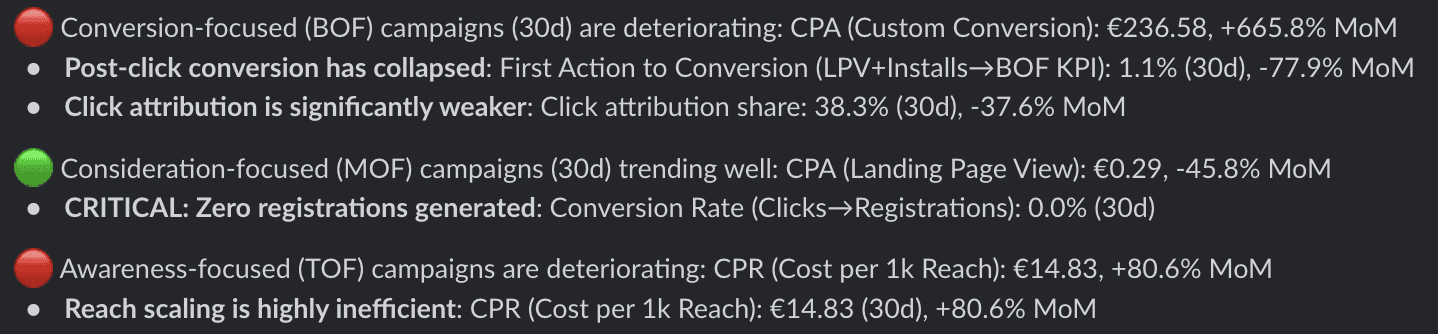
We’ve launched the new weekly Conversion Trends signal — full-funnel diagnostics in a single view.
Also included: ongoing usability improvements across Slack and the app

Plug now includes the core building blocks for proactive Meta monitoring:
Direct Meta integration to securely connect ad accounts
Deep links into Ads Manager for faster execution
Multi–ad account grouping for agencies and multi-market teams
Slack-based Signal delivery with Performance Snapshots and Priority Digests
Recommendation memory to reduce repeated alerts and keep focus on what changed