Plug Preview: your morning ad account check, done in a minute
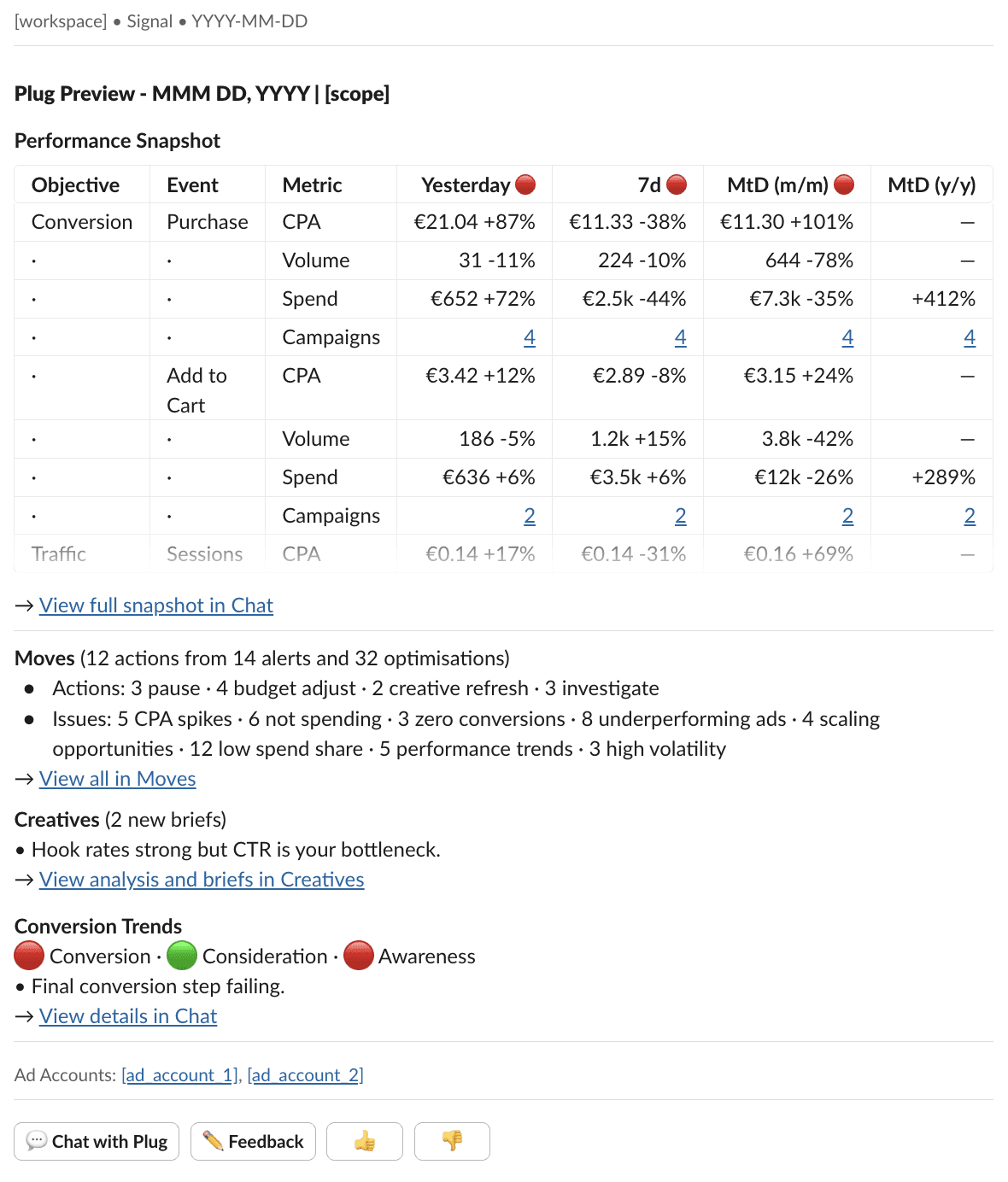
Every morning, one Slack message tells you everything you need to know about your Meta ad account. Open it, scan the table, and know if you need to act. Done.
Plug Preview surfaces
Performance development across timeframes. Traffic lights flag what moved across time frames. CPA, volume, spend by objective.
Action recommendations from Moves. Pending actions by type: pause, budget adjust, creative refresh, investigate. One click to the full picture.
Core findings from weekly Creative Briefs. New briefs surfaced with a one-line summary. Click through for the full analysis and production recommendations.
Weekly conversion trend changes. Funnel health at a glance: traffic lights per stage and one diagnostic insight.
Accounts for your account structure with Scopes
Your ad account structure might not be simple. Maybe you have several ad accounts to run separate markets, or you want to see testing campaigns separately from always-on. Plug Preview handles this with scopes:
✅ One per ad account by default
✅ Combine several ad accounts into one
✅ Label-based: split "Testing" campaigns from "Always-on" within the same ad account, because they have different performance expectations
✅ Custom schedule: testing scope on weekdays only, always-on daily, each at the time that fits your morning
No tabs to open, no dashboards to check. See the status, dig deeper and take action only where it matters.